
Enterprise IPL Playbook — Practitioner & Service Delivery

Make the shop easier to use than the workaround.

Front-line practitioners, specialists, administrative departments, facilities. Build the path of least resistance for every submitter.

People work around the in-plant when the workaround feels faster, clearer, or more predictable.

A clinical team runs materials on the staff-room copier because the portal feels slow. A specialist sends work outside because she is unsure whether the shop can handle the format. HR uses the same vendor every year because the mailing process is already familiar. Facilities calls a sign shop because wide-format production feels separate from the in-plant.

The DIY tax — the hours the institution's people spend producing or chasing materials they should never have owned — accumulates across every one of these submitter types. That cost is real, and it belongs in the conversation.

This playbook helps you find those workarounds and replace them with a better path.

Start with one submitter group. Track how jobs enter the shop, where submissions break down, how often people ask for status, and which work still routes around the in-plant. Then use the data to make the shop easier to use.

Playbook at a glance

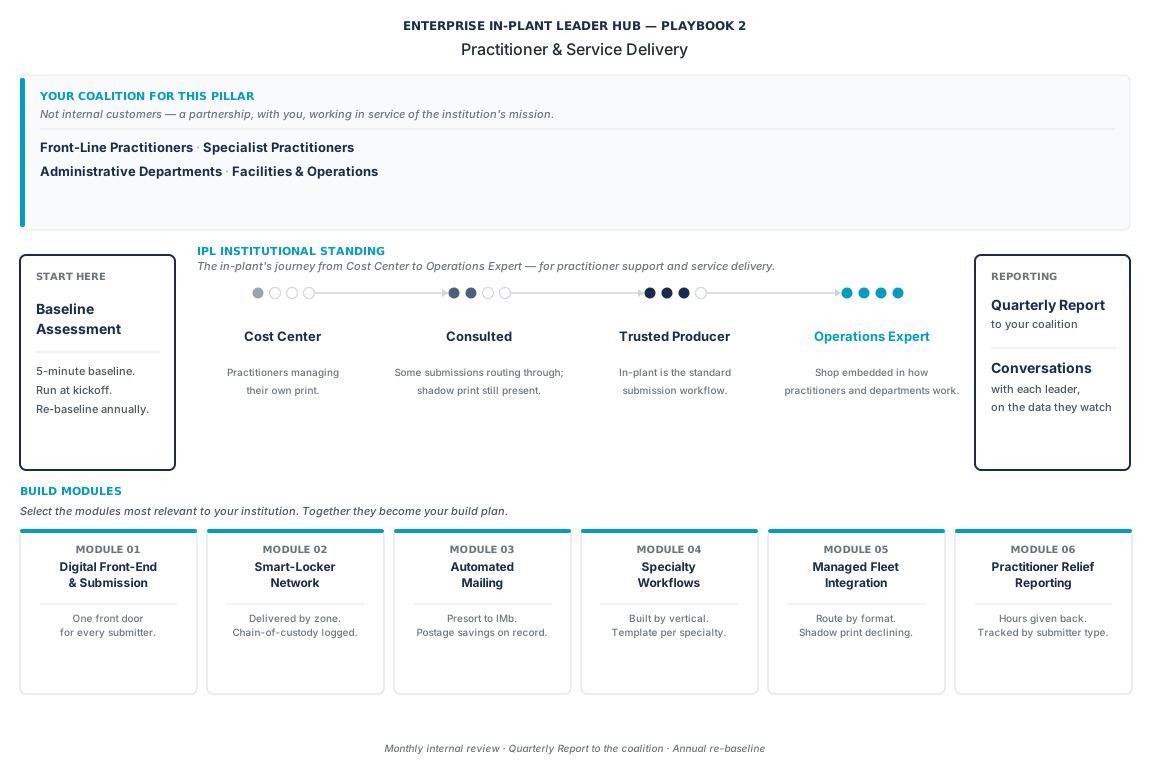
The whole playbook in one view

Submitter groups, maturity arc, build modules, and reporting cadence. The detail follows below; this is the map.

Practitioner & Service Delivery playbook diagram. Submitter groups: Front-line Practitioners, Specialist Practitioners, Administrative Departments, Facilities and Operations. Maturity arc: Cost Center, Consulted, Trusted Producer, Operations Expert. Six build modules: Default submission path, Service-class discipline, Visibility before complexity, Smart-locker delivery, Automated mailing, Time-returned reporting.

Who submits work to your shop

Four types of people send jobs to the in-plant.

Front-line practitioners doing daily clinical or operational work, specialist practitioners with time-bound and high-stakes production needs, administrative departments running HR and compliance and internal communications, and facilities and operations teams producing the physical-infrastructure layer.

Each one measures the shop differently. Each one has a different version of what good looks like. This playbook is organized around those four submitter types because that is how the shop's service-delivery relationship works in practice — and because the conversation you need to have with a department head in HR is not the same conversation you need to have with the clinical team leads or the facilities director.

What this playbook helps you prove

Practitioner & Service Delivery is about the experience of submitting work to the shop.

The submitter may be a clinician, caseworker, program manager, HR leader, facilities team, project manager, field engineer, development office, or internal communications team. The title changes by organization. The question stays practical:

Can people get work into the shop clearly, track it easily, and trust it will come back when promised?

This playbook helps answer four questions:

  1. Which submitter groups use the shop well today?
  2. Where do submissions arrive incomplete or unclear?
  3. Which teams still route around the in-plant?
  4. What would make the shop the easier default?

The goal is to reduce the time people spend chasing, fixing, reprinting, or producing materials themselves.

Start with the submission path

Most service problems begin before production.

A job arrives without the right file. A due date means something different to the submitter than it means to the shop. A recurring mailing comes through a side channel. A department submits by email because the portal doesn't match the way the work is actually requested. These are intake problems before they are production problems.

Begin by mapping how one submitter group sends work today. Then compare that path to the path you want them to use.

The scorecard

The metrics most likely to matter in a Practitioner & Service Delivery conversation.

The number that travels furthest here is bad-input rate. It is the diagnostic for whether your intake workflow is being honored or worked around. A perfect web-to-print portal with a 35% bad-input rate is still consuming prepress hours that should be production hours.

The service-delivery rows of the Outcomes Scorecard. Use these as your quarterly baseline for the practitioner conversations.
Metric What it shows How to use it
Bad-input rate How often submissions arrive incomplete or unclear. Track by submitter group. Flag at intake. A single group generating disproportionate bad-input is an upstream education problem, not a shop execution problem. This is the highest-payoff service metric.
Submission turnaround Time from request received to production start — isolates intake discipline from production execution. Use median time. Report by service class.
On-time rate by service class Whether the shop meets committed timelines for Standard, Rush, Critical, and Complex work. Track service classes only if they are published and enforced. Critical-class on-time is the headline number for the practitioner conversation.
Service-class adoption rate Whether submitters are using the intake structure correctly. A service classification framework that nobody uses isn't a framework — it's a wishlist. Aim for 90%+ once the framework is in place.
Status inquiry volume How often submitters call or email to ask where a job stands. A high number usually means visibility infrastructure is not doing its job. Track ratio of direct-contact inquiries to portal status-checks.
Pickup or delivery cycle time How long completed work waits before the submitter receives it. Use this for lockers, routed delivery, mail, or department pickup.
Workaround volume How much work still goes to department devices or outside vendors. Track visible work first. Partial visibility is enough to start.
Peak-period performance Whether the shop holds timing and quality during high-volume periods. Compare peak windows to baseline and document what changed.

If you only track three numbers this quarter, start with bad-input rate, submission turnaround, and status inquiry volume. Together, they show whether the shop is easy to use, whether intake is working, and whether submitters trust the visibility they have.

What each submitter group cares about

Four submitter groups. Four different versions of the same question.

Each group measures the shop on a different axis. The guides below translate the shop's numbers into each group's practical concern — and map the conversation you'll need to have.

Filter by submitter group

Front-line practitioners

Front-line practitioners — the in-plant should be the easy part of the day

Front-line practitioners care whether the work comes back when they need it without adding another task to their day.

In healthcare: physicians, nurses, NPs, PAs, and clinical staff. In senior living: direct-care staff, nurses, and resident-facing program leads. In nonprofit work: caseworkers, program staff, frontline service-delivery teams. In commercial B2B: project managers, field engineers, jobsite leads, account managers.

These practitioners are carrying clinical loads, caseloads, and project schedules. The in-plant should be the easy part of their day, not another thing they have to manage. The objections you hear most often: "the staff-room copier feels faster," "I started using FedEx because the in-plant wasn't reliable," "I print my own because nobody answers the phone."

Bring: bad-input rate trend, submission turnaround for the Critical class, status inquiry volume, and a documented submission workflow with templates for their recurring work types.

Specialist practitioners

Specialist practitioners — format, quality, timing, sensitivity

Specialist practitioners care whether the shop can handle the format, quality, timing, or sensitivity their work requires.

In healthcare: research clinicians, specialty service lines, clinical-trial coordinators. In senior living: therapy specialists, memory-care leads. In commercial B2B: engineering specialists, proposal-capture leads, technical writers on a major bid.

These practitioners are doing time-bounded, high-stakes work with production needs the front-line coalition doesn't share. Short-run, time-bound to a regulatory deadline, a clinical-trial milestone, or a proposal submission cutoff. The common objection: "the time-pressure on my work is different from the routine submitter's."

Bring: specialty-tagged submission turnaround by job type, a clear description of what the shop can commit to, and a standing offer to be in the specialty-cycle planning conversation before the deadline arrives.

Administrative departments

Administrative departments — less coordination, fewer vendor handoffs

Administrative departments care whether recurring work can run with less coordination and fewer vendor handoffs.

In healthcare: HR, Internal Comms, Finance, Patient Access. In senior living: HR, Sales, Family Services. In nonprofit: Development, Comms, HR. In commercial B2B: HR, Accounting, Business Development, Internal Comms.

Much of this work is variable-data, time-bound to a fiscal or HR cycle, and routinely outsourced because nobody asked the in-plant. Common objections: "open enrollment goes to a third party every year because nobody knew we could do it in-house," "we outsource the mailings because the in-plant's mailing operation isn't connected to our database."

Bring: administrative-tagged submission turnaround by submitter type, specific recent examples (an HR open-enrollment kit, a tax-form mailing with documented postage savings), and a standing offer to audit currently-outsourced administrative print for in-house absorption.

Facilities and operations

Facilities and operations — signage, wayfinding, events, field materials

Facilities and operations teams care whether the in-plant can support signage, wayfinding, events, and field materials at the pace their work requires.

In healthcare: facilities, wayfinding, patient-room signage. In senior living: facilities, memory-care wayfinding, public-area display. In nonprofit: event production, volunteer operations. In commercial B2B: field operations, site signage, trade-show and event production.

Most of this work is wide-format, durable-substrate, time-bound to a building event, facility opening, or trade show. The common objection: "the in-plant doesn't carry the substrates I need." The first task is often visibility: many facilities teams simply haven't thought of the in-plant as the first call.

Bring: turnaround history, cost comparisons against regional commercial alternatives, durable-substrate inventory, and a pilot opportunity tied to one event or recurring facility need.

Where your shop stands today

A maturity model for service delivery.

Use this maturity model to place your current service delivery honestly. The continuum is the same across health systems, senior living, nonprofit, and commercial B2B in-plants; what changes is which submitter types dominate at each level.

Level 1
Cost Center
Submitters manage their own print because the supported path is harder than the workaround.
Read the full description
Practitioners run their own materials on departmental or staff-room copiers. Specialty work routes to outside vendors. Administrative offices have vendor relationships that started years ago. Facilities goes to regional sign and wide-format providers. The institution is paying for the work three times: in shadow print volume on building copiers, in outside vendor invoices, and in the time practitioners spend producing materials themselves.
Where most shops live today
Level 2
Consulted
The in-plant receives some work but intake is inconsistent — and submitters still chase status.
Read the full description
The in-plant receives some high-volume or finished work, but intake is inconsistent. Jobs arrive by email, walk-in, or old forms. Turnaround is unpredictable because intake doesn't capture the right specs the first time. Bad-input rate is high. Visibility is low, so submitters still chase status.
The move that changes the conversation
Level 3
Trusted Producer
A clear submission workflow, service classes that hold, and visibility that eliminates status calls.
Read the full description
A web-to-print portal (webCRD, OnPrintShop, PageDNA, Canon UniFlow Online, or equivalent) is the institution's default submission path. Templates by submitter type make routine work one-click. Service classification is published and enforced at intake. Visibility infrastructure eliminates "where is it?" inquiries. Bad-input rate is below 10%. The shop is the easy choice, and shadow print volume starts to drop.
Level 4
Operations Expert
The shop is no longer a destination. It is infrastructure inside the institution's workflow.
Read the full description
Materials route from the shop to smart lockers placed in practitioner-adjacent locations, with automated recipient notification. Mailing operations run end-to-end through the in-plant with presort, NCOA, IMb compliance, variable-data composition, and HIPAA-compliant data handling. The fleet integrates with departmental devices so the in-plant can absorb routine workflow without the practitioner thinking about which device produced what. The shop is no longer a destination. It is infrastructure.
The maturity question is whose time the system is spending. Levels 1 and 2 spend the practitioner's. Levels 3 and 4 hold the work where it belongs. The move that creates practitioner trust is Level 2 to Level 3. The move that changes the conversation at budget time is Level 3 to Level 4.

Six build modules for Practitioner & Service Delivery

Select the modules most relevant to your institution and submitter mix.

Together, the ones you take on become your build plan.

01
Build the default submission path
Make the portal or intake workflow the clearest way to submit — not just one option among many.
Read the full description

Select and deploy a web-to-print front-end appropriate to the institution's submitter mix. Build templates by submitter type. Set service classification as a required field at intake. Publish the submission standard. Make the portal, form, or intake workflow the clearest way to submit work — not just one option among many.

Start with recurring work that creates the most friction. Build templates that capture the specs your team usually has to chase.

Measure: bad-input rate, submission turnaround, and service-class adoption.

02
Publish service classes the shop can defend
Submitters need clear choices. The shop needs a way to protect capacity.
Read the full description

Submitters need clear choices. The shop needs a way to protect capacity.

Use a small set of service classes — Standard, Rush, Critical, Complex — and define what each means in plain language. The language should be simple enough for submitters to use and firm enough for the shop to enforce. A service-class framework nobody uses is a wishlist.

Measure: on-time rate by class and valid service-class use.

03
Improve visibility before adding complexity
Many status calls happen because submitters don't trust what they can see.
Read the full description

Many status calls happen because submitters don't trust what they can see. Start with the basics: confirmation, current status, ready notification, and delivery or pickup confirmation. Improve the simplest visibility layer first.

Measure: status inquiry volume and portal or dashboard use.

04
Deploy smart-locker delivery where volumes justify it
Eliminate the "where is my job?" call by moving completion to a self-serve locker.
Read the full description

Audit campus or facility geography for high-traffic practitioner zones. Deploy a locker network with notification and access control integration. Build chain-of-custody records for any locker drop containing controlled-handling material. When smart-locker delivery is in place, the fraction of "where is my job?" calls that never need to happen is measurable.

Measure: locker checkout cycle time by node and fraction of total delivered volume routed through lockers.

05
Build automated mailing capability
Absorb the annual institutional mailings that routinely go outside.
Read the full description

Presort processing, CASS-certified address verification, NCOA on every cycle, IMb compliance, variable-data composition integrated with institutional CRM and HR data sources — this is the mailing capability that lets the in-plant absorb the annual institutional mailings that routinely go outside. Build templates for recurring institutional mailings.

Measure: automated mailing volume versus baseline, postage-savings dollars per period, undeliverable rate post-NCOA.

06
Report time returned
Translate service metrics into the effort the shop removed for each submitter group.
Read the full description

The coalition may not care how many jobs the shop produced. It cares how much effort the shop removed.

Translate service metrics into practical language: fewer clarification emails, fewer status calls, fewer local copier runs, fewer vendor handoffs, less time spent managing production logistics. Per-coalition reporting cadence matters — the front-line practitioner conversation is different from the administrative department conversation.

Measure: reporting cadence and improvements accepted by submitter groups.

A practical 90-day baseline

Choose one submitter group and track its work for 90 days.

Use this checklist:

  • Submitter group
  • Work type
  • Submission path
  • Completeness at intake
  • Time from submission to production start
  • On-time result
  • Status inquiries
  • Rework or clarification needed
  • Delivery or pickup result
  • Work still routed outside the shop

At the end of 90 days, write a one-page summary. Show what made the shop easier to use, what still caused friction, and which workflow change should happen next.

Frequently asked questions

Practitioner & Service Delivery — the questions in-plant leaders ask.

Four groups send jobs to the in-plant: front-line practitioners (clinicians, caseworkers, project managers), specialist practitioners with time-bound and high-stakes production needs, administrative departments running HR and compliance cycles, and facilities and operations teams producing signage and field materials. Each group measures the shop differently and needs a tailored submission approach.

Bad-input rate measures how often submissions arrive incomplete or unclear. It is the highest-payoff service delivery metric because it is a diagnostic for whether your intake workflow is being honored or worked around — a perfect web-to-print portal with a 35% bad-input rate is still consuming prepress hours that should be production hours. A single submitter group generating disproportionate bad-input is an upstream education problem, not a shop execution problem.

Start by mapping how one submitter group sends work today and comparing that path to the path you want them to use. Track bad-input rate, submission turnaround, and status inquiry volume for 90 days. Most service problems begin at intake — a job that arrives without the right file or with an ambiguous due date is an intake problem before it is a production problem.

At Level 3, a web-to-print portal (webCRD, OnPrintShop, PageDNA, or Canon UniFlow Online) is the institution's default submission path, bad-input rate is below 10%, and visibility infrastructure eliminates status calls. At Level 4, materials route to smart lockers in practitioner-adjacent locations and mailing operations run end-to-end with NCOA, IMb compliance, and HIPAA-compliant data handling — the shop is no longer a destination, it is infrastructure.

Bring data specific to the coalition partner's concerns. For front-line practitioners, bring bad-input rate trend, Critical-class submission turnaround, and status inquiry volume. For administrative departments, bring specific examples — an HR open-enrollment kit produced in-house, a tax-form mailing with documented postage savings — and an offer to audit currently-outsourced administrative print for in-house absorption.

Start the conversation

Make the shop easier to use than the workaround.

Bring SumnerOne into the conversation about submission workflow, service-class discipline, smart-locker delivery, automated mailing, or any of the six modules above. We will help you choose the right starting submitter group, baseline the work for 90 days, and translate the result into the language your institution can use.

One submitter group. One workflow. Ninety days. That is enough to begin.